Monday, August 24, 2015

Mhddfs – Combine Several Smaller Partition into One Large Virtual Storage

http://www.tecmint.com/combine-partitions-into-one-in-linux-using-mhddfs

Let’s assume that you have 30GB of movies and you have 3 drives each 20 GB in size. So how will you store?
Obviously you can split your videos in two or three different volumes and store them on the drive manually. This certainly is not a good idea, it is an exhaustive work which requires manual intervention and a lots of your time.
Another solution is to create a RAID array of disk. The RAID has always remained notorious for loss of storage reliability and usable disk space. Another solution is mhddfs.
Combine Multiple Partitions in Linux
Mhddfs – Combine Multiple Partitions in Linux
mhddfs is a driver for Linux that combines several mount points into one virtual disk. It is a fuse based driver, which provides a easy solution for large data storage. It combines all small file systems to create a single big virtual filesystem which contains every particle of its member filesystem including files and free spaces.

Why you need Mhddfs?

All your storage devices creates a single virtual pool and it can be mounted right at the boot. This small utility takes care of, which drive is full and which is empty and to write data to what drive, intelligently. Once you create virtual drives successfully, you can share your virtual filesystem using SAMBA. Your client will always see a huge drive and lots of free space.

Features of Mhddfs

  1. Get attributes of the file system and system information.
  2. Set attributes of the file system.
  3. Create, Read, Remove and write Directories and files.
  4. Support for file locks and Hardlinks on single device.
Pros of mhddfsCons of mhddfs
 Perfect for home users.mhddfs driver is not built in the Linux Kernel
 Simple to run. Required lots of processing power during runtime
 No evidence of Data loss No redundancy solution.
 Do not split the file. Hardlinks moving not supported
 Add new files to the combined virtual filesystem. 
 Manage the location where these files are saved. 
  Extended file attributes 

Installation of Mhddfs in Linux

On Debian and portable to alike systems, you can install mhddfs package using following command.
# apt-get update && apt-get install mhddfs
Install Mhddfs on Debian based Systems
On RHEL/CentOS Linux systems, you need to turn on epel-repository and then execute the below command to install mhddfs package.
# yum install mhddfs
On Fedora 22+ systems, you may get it by dnf package manger as shown below.
# dnf install mhddfs
Install Mhddfs on Fedora
If incase, mhddfs package isn’t available from epel repository, then you need to resolve following dependencies to install and compile it from source as shown below.
  1. FUSE header files
  2. GCC
  3. libc6 header files
  4. uthash header files
  5. libattr1 header files (optional)
Next, download the latest source package simply as suggested below and compile it.
# wget http://mhddfs.uvw.ru/downloads/mhddfs_0.1.39.tar.gz
# tar -zxvf mhddfs*.tar.gz
# cd mhddfs-0.1.39/
# make
You should be able to see binary mhddfs in the current directory. Move it to /usr/bin/ and /usr/local/bin/ as root.
# cp mhddfs /usr/bin/ 
# cp mhddfs /usr/local/bin/
All set, mhddfs is ready to be used.

How do I use Mhddfs?

1. Lets see all the HDD mounted to my system currently.
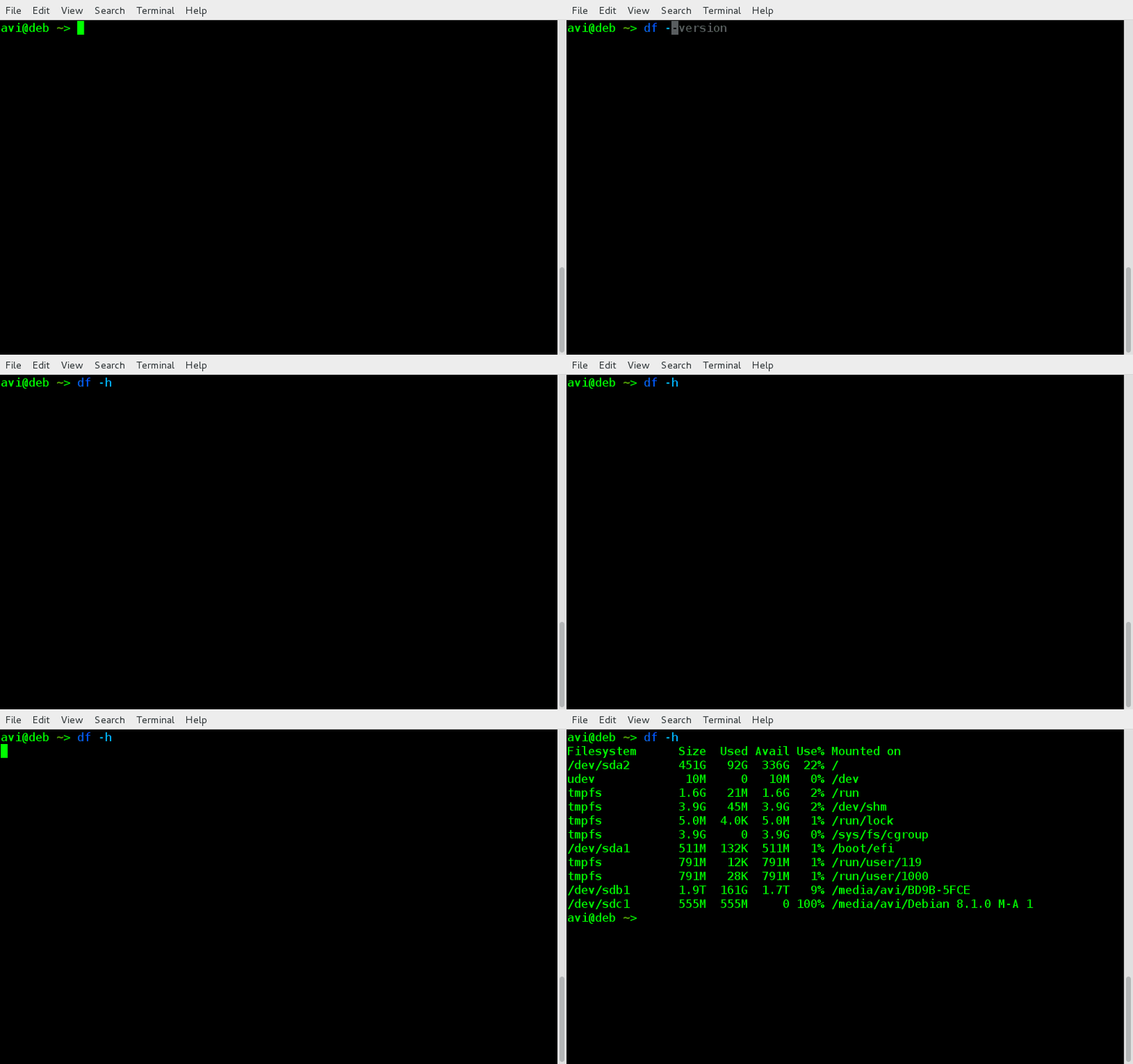
$ df -h
Check Mounted Devices
Sample Output
Filesystem      Size  Used Avail Use% Mounted on

/dev/sda1       511M  132K  511M   1% /boot/efi
/dev/sda2       451G   92G  336G  22% /
/dev/sdb1       1.9T  161G  1.7T   9% /media/avi/BD9B-5FCE
/dev/sdc1       555M  555M     0 100% /media/avi/Debian 8.1.0 M-A 1
Notice the ‘Mount Point‘ name here, which we will be using later.
2. Create a directory /mnt/virtual_hdd where all these all file system will be grouped together as,
# mkdir /mnt/virtual_hdd
3. And then mount all the file-systems. Either as root or as a user who is a member of FUSE group.
# mhddfs /boot/efi, /, /media/avi/BD9B-5FCE/, /media/avi/Debian\ 8.1.0\ M-A\ 1/ /mnt/virtual_hdd  -o allow_other
Mount All File System in Linux
Note: We are used mount Point names here of all the HDDs. Obviously the mount point in your case will be different. Also notice “-o allow_other” option makes this Virtual file system visible to all others and not only the person who created it.
4. Now run “df -h” see all the filesystems. It should contain the one you created just now.
$ df -h
Verify Virtual File System Mount
You can perform all the option to the Virtual File System you created as you would have done to a Mounted Drive.
5. To create this Virtual File system on every system boot, you should add the below line of code (in your case it should be different, depending upon your mount point), at the end of /etc/fstab file as root.
mhddfs# /boot/efi, /, /media/avi/BD9B-5FCE/, /media/avi/Debian\ 8.1.0\ M-A\ 1/ /mnt/virtual_hdd fuse defaults,allow_other 0 0
6. If at any point of time you want to add/remove a new drive to Virtual_hdd, you may mount a new drive, copy the contents of mount point /mnt/virtual_hdd, un-mount the volume, Eject the Drive you want to remove and/or mount the new drive you want to include, Mount the overall filesystem under Virtual_hdd using mhddfscommand and you should be done.

How do I Un-Mount Virtual_hdd?

Unmounting virtual_hdd is as easy as,
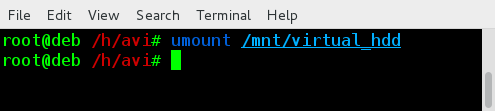
# umount /mnt/virtual_hdd
Unmount Virtual Filesystem
Notice it is umount and not unmount. A lot of user type it wrong.

Friday, August 21, 2015

How to Find and Remove Duplicate/Unwanted Files in Linux Using ‘FSlint’ Tool

http://www.tecmint.com/fslint-find-and-remove-duplicate-unwanted-files-in-linux

What is fslint?

fslint is a Linux utility to remove unwanted and problematic cruft in files and file names and thus keeps the computer clean. A large volume of unnecessary and unwanted files are called lint. fslint remove such unwanted lint from files and file names. Fslint help fight against unwanted files by coping with duplicate files, empty directories and improper names.

Features of fslint

  1. It is a combination of different tools that look after duplicate files, empty directories and improper name.
  2. Simple GTK+ Graphic front-end as well as command-line.
  3. Fslint cope with lint that relates to Duplicate files, Problematic filenames, Temporary files, Bad Symlinks, Empty directories and Non-stripped binaries.
  4. Help you in reclaiming disk space that were used by unnecessary and unwanted files.

Install fslint on a Linux

Installation of latest version of fslint package can be installed as easy as executing following command onDebian based systems such as Ubuntu and Linux Mint.
$ sudo apt-get install fslint
On CentOS/RHEL based distributions, you need to active epel repository to install fslint package.
# yum install fdupes
# dnf install fdupes    [On Fedora 22 onwards]

How do I use fslint Command?

Hope you know one of the basic rule of computation and understand the risk – have backup. Before you start testing this application make sure you have backup of everything on your system, so that even if an important file gets deleted you may restore almost immediately.
Now as you know that fslint is one such application that has a command-line interface as well as a front-end GUI at the same time. You may use either.
For developers and administrators, CLI version is preferred as it gives you immense power. GUI front-end is best suited to newbies and those who prefer GUI over CLI.

fslint Command Line Usage

The command line version of fslint is not on the path of most of the Linux users. You may access it at the location /usr/share/fslint/.
$ ./usr/share/fslint/fslint/fslint
Sample Output
-----------------------------------file name lint
./.config/google-chrome/Default/Pepper\ Data/Shockwave\ Flash/WritableRoot/#SharedObjects/NNPAG57S/videos.bhaskar.com/[[IMPORT]]
./Documents/.~lock.fslint\ -\ Remove\ duplicate\ files\ with\ fslint\ (230).odt#
./Documents/7\ Best\ Audio\ Player\ Plugins\ for\ WordPress\ (220).odt
./Documents/7\ Best\ WordPress\ Help\ Desk\ Plugins\ for\ Customer\ Support\ (219).odt
./Documents/A\ Linux\ User\ using\ Windows\ (Windows\ 10)\ after\ more\ than\ 8\ years(229).odt
./Documents/Add\ PayPal\ to\ WordPress(211).odt
./Documents/Atom\ Text\ Editor\ (202).odt
./Documents/Create\ Mailchimp\ account\ and\ Integrate\ it\ with\ WordPress(227).odt
./Documents/Export\ Feedburner\ feed\ and\ Import\ it\ to\ Mailchimp\ &\ setup\ RSS\ Feed\ Newsletter\ in\ Mailchimp(228).odt

----------------------------------DUPlicate files
Job 7, “/usr/share/fslint/fslint/fslint” has stopped
Important: Two things you should be kept in mind at this point. First fslint don’t delete any file on its own, It just shows you the lint files, their location and their name. You have to decide what to do with them. Second is fslint by default start searching from your ‘/home’ directory.
To search a different other than your /home directory, you must pass the directory name with the command, as:
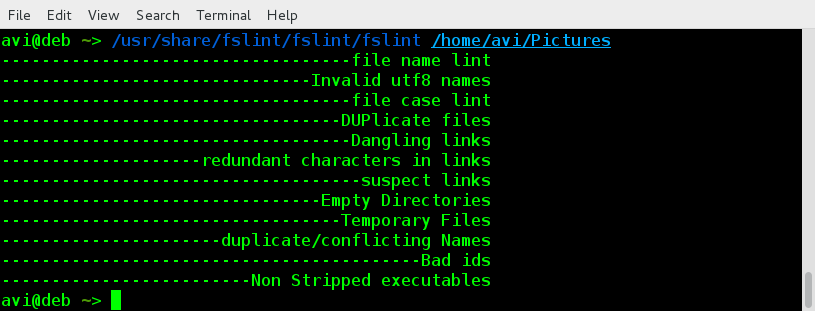
$ /usr/share/fslint/fslint/fslint /home/avi/Pictures
Find Duplicate Files in Linux
Find Duplicate Files
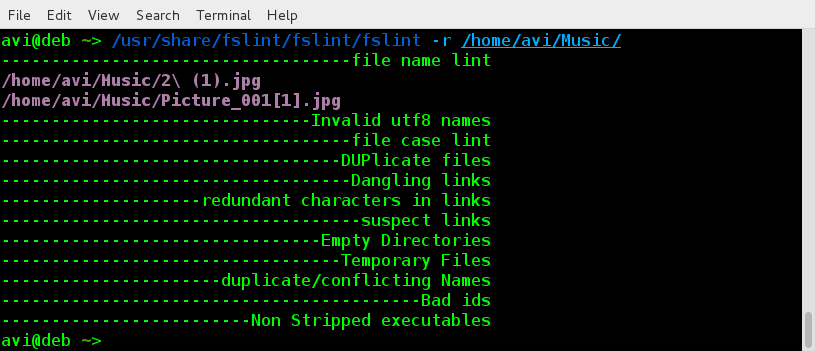
To search recursively to all the sub-folders, you should use flag ‘-r’, simply as:
$ /usr/share/fslint/fslint/fslint -r /home/avi/Music/
Find Duplicate Files Recursively

fslint GUI Usage

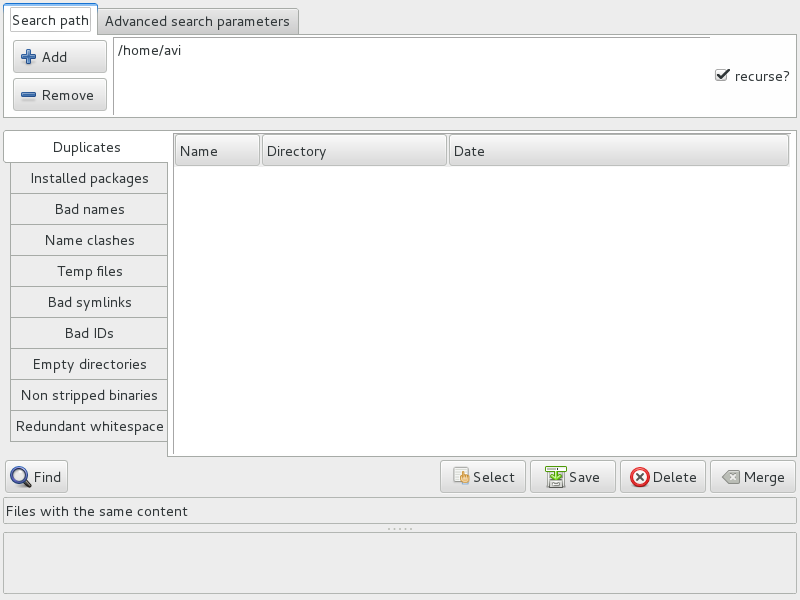
You may fire the GUI Application built on top of fslint by typing fslint from Linux terminal or from theApplication Menu.
$ fslint-gui
fslint Gui Tool
fslint Gui Tool
Everything in GUI is simple to understand. All you need to do is:
  1. Add/remove the directories to scan.
  2. Select to scan recursively or not by checking/unchecking checkbox on the top-right.
  3. Click on ‘Find’. And all done!
Again you should remember, this utility do not delete the lint files but provide you with the information only and leaves everything on you.

Conclusion

fslint is a perfect tool that remove lint of various types from a file system. Though it needs improvement in certain gray areas: –
  1. A bit slow for duplicate photo detection.
  2. Requires some improvement in User Interface.
  3. No Progress meter.

Saturday, August 15, 2015

20 years of Internet in India: A timeline

August 15, 1995, Videsh Sanchar Nigam Limited (VSNL) formally launched the Internet for the Indian public. It has been 20 very eventful years since and India and its Internet has come a long way from the dial-up modems and VSNL shell accounts. This timeline of the journey of the Internet in India highlights the important milestones of this two-decade-long journey.
Timeline of the Internet in India

Wednesday, August 12, 2015

July 31, 2015: Celebrate “System Administrator Appreciation Day”

http://www.tecmint.com/system-administrator-appreciation-day/

July 31st, 2015 is witnessing 16th System Administrator Appreciation Day. System Administrator Appreciation Day also known as Sysadmin Day, SysAdminDay, SAD or SAAD is celebrated on the last Friday of July every Year.
System Administrator Appreciation Day

Story behind System Administrator Appreciation Day

Ted Kekatos, a System Administrator by profession got inspired by an Advertisement in Hewlett-Packard Magazine where an Administrator is greeted in the form of flowers and fruit-baskets by thankful co-workers for their new printer installed. Kekatos idea was further recognised and promoted by lots of IT organizations and professional including the ‘League of Professional System Administrator‘, SAGE/USENIX, etc.
The first System Administrator Appreciation Day was celebrated on July 28, 2000. And since then celebrating System Administrator Appreciation Day every year gets a worldly recognition and today we reached the figure16th.

Significance of this Day

Celebrating System Administrator Appreciation Day is a way to Honour a person who is responsible for upkeep, configuration, Up-to mark Operation of Computer Systems and Server. A day when we want to say thanks to a person who ensures performance, uptime, resource, security, install, upgrade, automate task, troubleshoot, provides technical support, along with meeting the need of User and the company he is working for within the resource and budget he is provided with.
This 24 hour celebration is an honest way to feel proud of a person who:
  1. Analyse potential issues and logs.
  2. Keep himself/herself updated with new technologies and integrate it into data center.
  3. Performs routine audit of software and System.
  4. Updates System.
  5. Apply patches.
  6. Configure System and Software.
  7. Add and Configure new hardware and software.
  8. One person whom you trust for security, project documentation.
  9. Troubleshoot and Performance System Tuning.
  10. Creates, Manage and Maintains Network Infrastructure.
Simply, a person who works 364 days a year (Yeah 364, Leave him/her on SAAD) behind the scene just to provide a nice and secure platform you can work with.
System Administrator is the only person who gets recognition (although, the other way) when he commits something wrong.

How to Celebrate

Well celebration always means beyond words. Chocolates, Cards, Cake, Ice Cream, Pizza, Balloons, Flowers, fruits, Pile of CASH just adds to the list.
Many online business gives special offers as an honour to IT professionals and System Administrators this day. This is the one special day when you recognize your System Administrator for their contribution and all other things they do for you and your organization.

‘LinuxSay’ – A Discussion Forum for Linux Enthusiasts

http://www.tecmint.com/launching-linuxsay-a-discussion-forum-for-linux-enthusiasts/

What is LinuxSay.com?

Linuxsay.com (A Discussion Forum for Linux Enthusiasts) is a sister site of Tecmint. It is an online collaboration platform for Linux and open source users to raise questions, obtain answers to your questions, discuss topics ranging from Linux/FOSS related news to server administration to programming languages, as well as an area for general Linux/FOSS discussion.

Features of LinuxSay.com

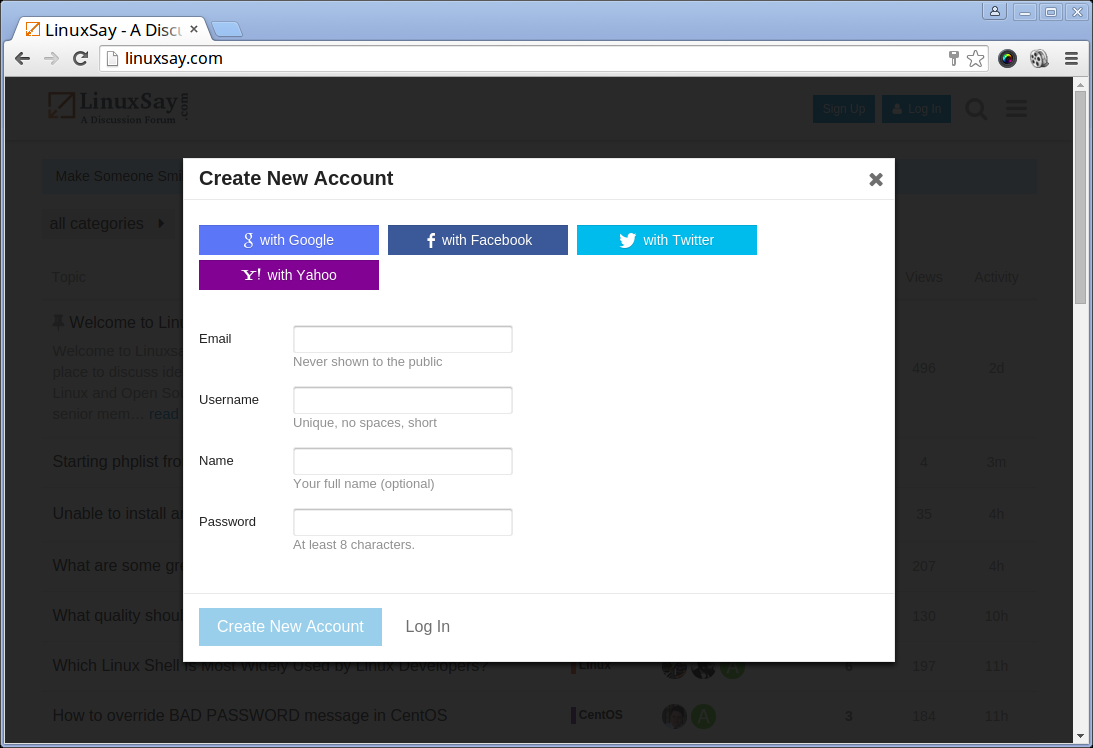
You do not need to register to access the content of the site. However to post questions, you need to sign-up at Linuxsay. Signing up is quite easy. You can even signing up using social media profiles such as Google+, Facebook, Twitter and Yahoo. After signup, auto-import of profile icon between your social media profile and Linuxsay.
LinuxSay Signup with Social Profiles
Using LinuxSay is pretty straightforward thanks to a very friendly user interface with instant email notification when someone likes/replies to your post.
LinuxSay Interface
LinuxSay Interface
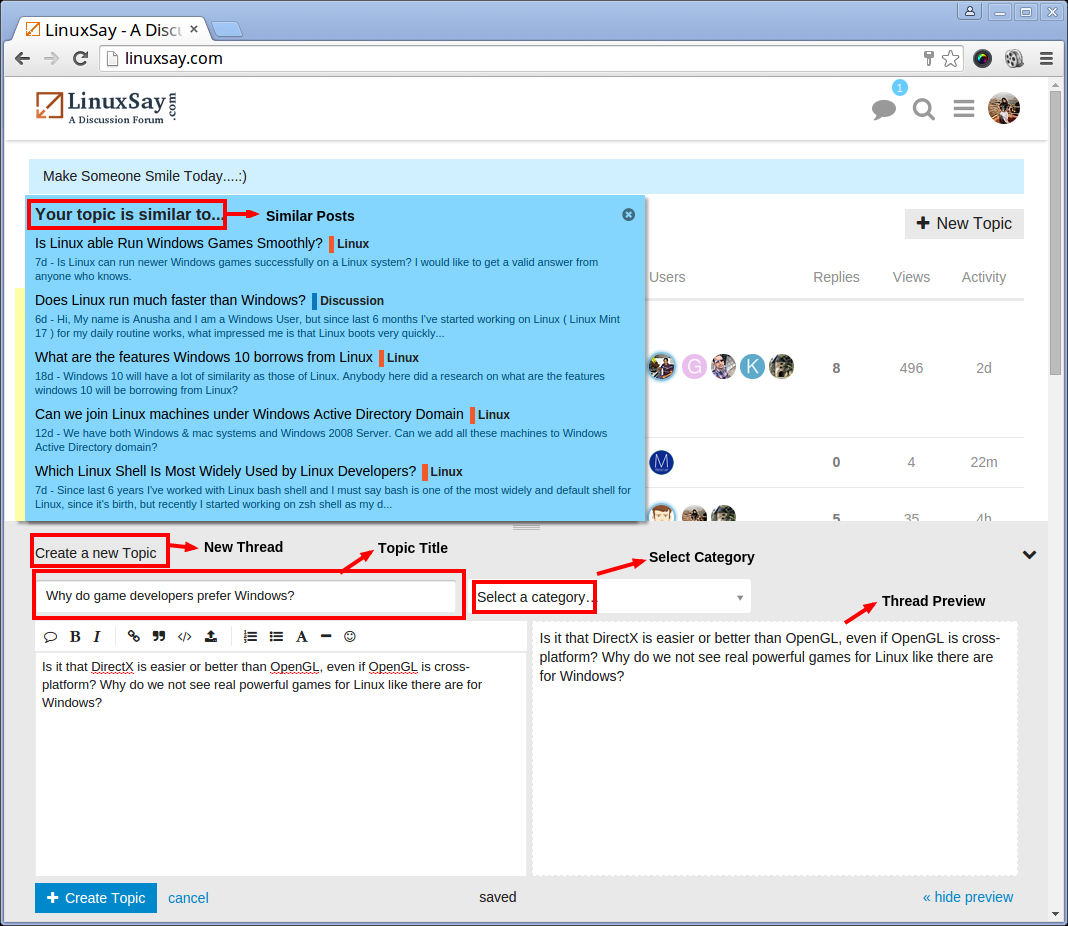
You can create a thread for your question right from the board and post query/question in relevant already created forum categories with just a single click. It also provides a powerful search function to search threads for answers to questions that may have already been answered.
Create A New Thread
Create A New Thread
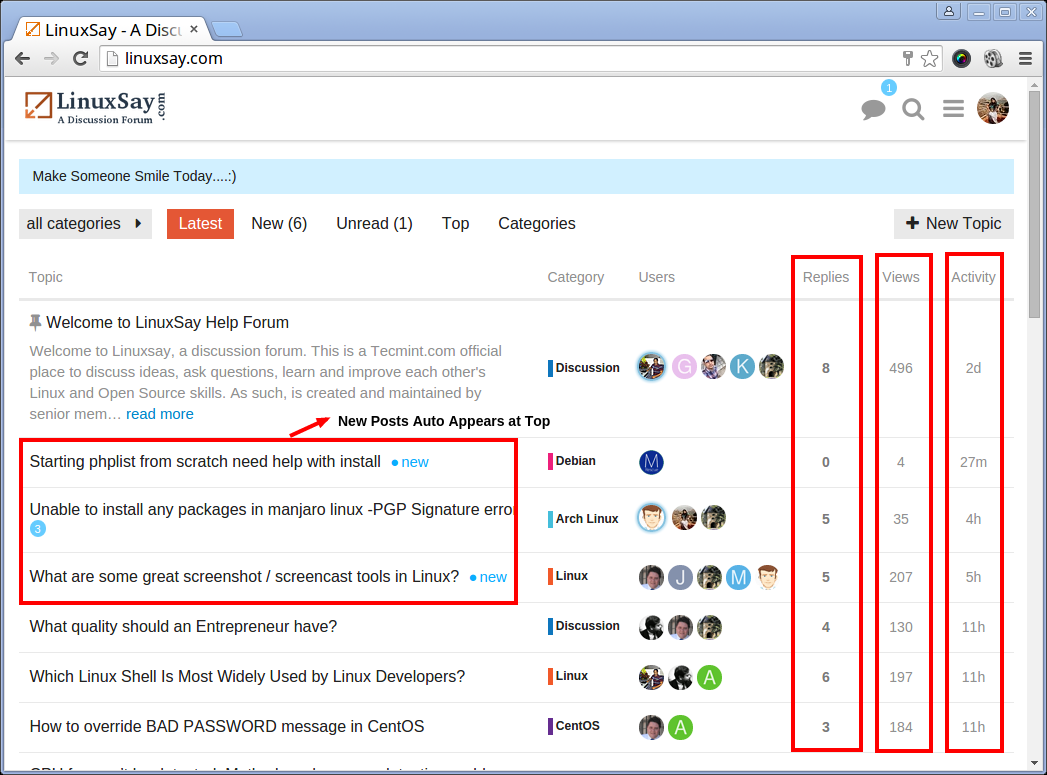
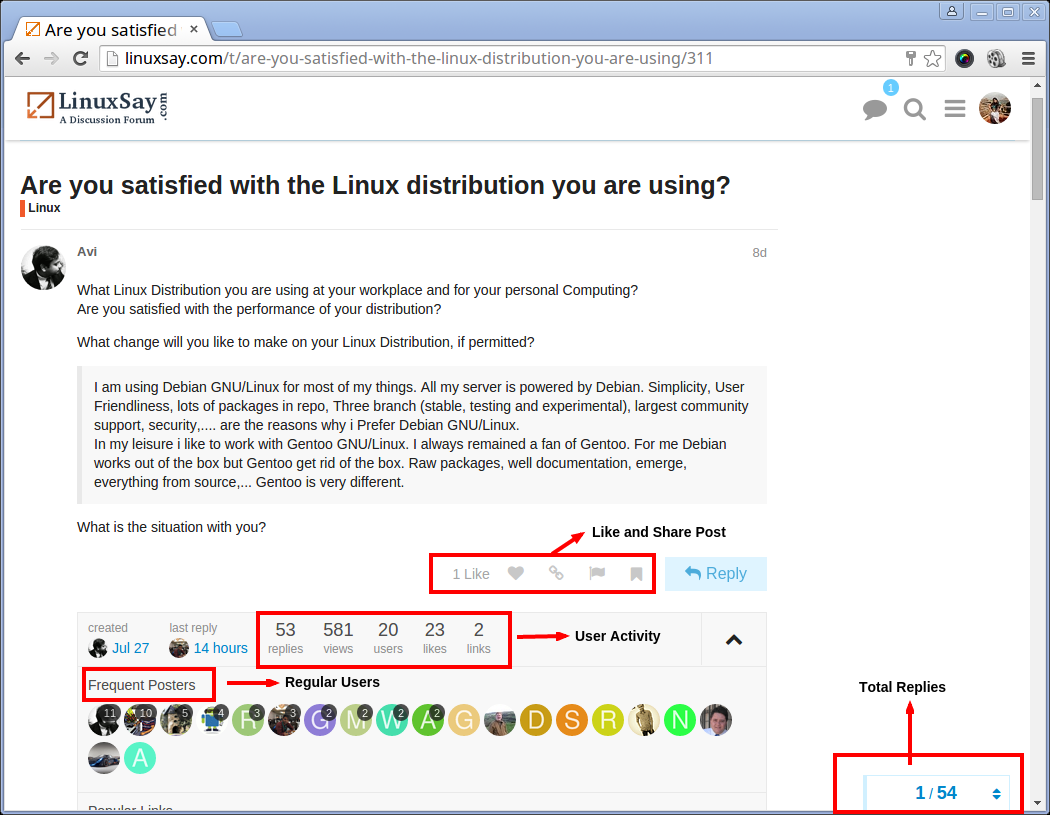
Auto-updating of the order of topics/threads based upon last reply with the latest replies appearing at the top with total number of Replies, Last reply by, Total Views and Last Activity for each topic/thread is visible to every user.
User Activity
User Activity
Post Activity
Post Activity
Allows you to Get answers to your questions from professionals across the globe in less than 24 hours. Gives you the possibility to solve others’ problems and answer their questions, if you can.
Best of all, Linuxsay is completely free! No Debit/Credit card information required.