Showing posts with label CloudComputing. Show all posts

Thursday, November 12, 2015

12 Open Source Cloud Storage Software to Store and Sync Your Data Quickly and Safely

Cloud by name indicates something which is very huge and present over a large area. Going by the name, in technical field, Cloud is something which is virtual and provides services to end users in form of storage, hosting of apps or virtualizing any physical space. Now a days, Cloud computing is used by small as well as large organizations for data storage or providing customers with its advantages which are listed above.
Free Open Source Cloud Storage Softwares for Linux                                    12 Free Open Source Cloud Storage Software’s
Mainly, three types of Services come associated with Cloud which are: SaaS (Software as a Service) for allowing users to access other publically available clouds of large organizations for storing their data like: gmail, PaaS (Platform as a Service) for hosting of apps or software on Others public cloud ex: Google App Engine which hosts apps of users, IaaS (Infrastructure as a Service) for virtualizing any physical machine and availing it to customers to make them get feel of a real machine.
Cloud Storage
Cloud Storage means storage of data away from users local system and across the span of dedicated servers which are meant for this. At its earliest, CompuServe in 1983 offered its customers 128k of disk space which could be used to store files. Whereas this field is under active development and will be because of potential threats including: loss of data or information, data hacking or masquerading and other attacks, many organizations have come forward with their own solutions to Cloud Storage and Data Privacy which is strengthening and stabilizing its future.
In this article, we will present some of selected contributions for this concern which are open source and successfully being accepted by huge masses and big organizations.
1. OwnCloud
A Dropbox replacement for Linux users, giving many functionalities which are similar to that of DropBox, ownCloud is a self-hosted file sync and share server.
Its open source functionality provides users with access to unlimited amount of storage space. Project started in January 2010 with aim to provide open source replacement for proprietary cloud storage service providers. It is written in PHP, JavaScript and available for Windows, Linux, OS X desktops and even successfully provides mobile clients for Android and iOS.
OwnCloud employs WebDav server for remote access and can integrate with large number of Databases including: SQLite, MariaDB, MySQL, Oracle Database, PostgreSQL.
Provides large number of features countable of which include: File storage and encryption, Music Streaming, content sharing across URL’s, Mozilla sync hosting and RSS/Atom feed reader, one-click app installation, Video and PDF viewer and many more.
The latest version of ownCloud i.e. 8.2 adds on other new features including: improved design, allows admin to notify users and set retention limits on files in the trash.
OwnCloud                                                                             OwnCloud
2. Seafile
Another file hosting software system which exploits open source property to avail its users with all advantages they expect from a good cloud storage software system. It is written in C, Python with latest stable release being 4.4.3 released on 15th October 2015.
Seafile provides desktop client for Windows, Linux, and OS X and mobile clients for Android, iOS and Windows Phone. Along with a community edition released under General Public License, it also has a professional edition released under commercial license which provides extra features not supported in community edition i.e. user logging and text search.
Since it got open sourced in July 2012, it started gaining international attention. Its main features are syncing and sharing with main focus on data safety. Other features of Seafile which have made it common in many universities like: University Mainz, University HU Berlin and University Strasbourg and also among other thousands of people worldwide are: online file editing, differential sync to minimize the bandwidth required, client-side encryption to secure client data.
Seafile Cloud Storage                                                                Seafile Cloud Storage
3. Pydio
Earlier known by the name AjaXplorer, Pydio is a freeware aiming to provide file hosting, sharing and syncing. As a project it was initiated in 2009 by Charles du jeu and since 2010, it is on all NAS equipment’s supplied by LaCie.
Pydio is written in PHP and JavaScript and available for Windows, Mac OS and Linux and additionally for iOS and Android also. With nearly 500,000 downloads on Sourceforge, and acceptance by companies like Red Hat and Oracle, Pydio is one of the very popular Cloud Storage Software in the market.
In itself, Pydio is just a core which runs on a web server and can be accessed through any browser. Its integrated WebDAV interface makes it ideal for online file management and SSL/TLS encryption makes transmission channels encrypted securing the data and ensuring its privacy. Other features which come with this software are: text editor with syntax highlighting, audio and video playback, integration of Amazon, S3, FTP or MySQL Databases, image editor, file or folder sharing even through public URL’s.

Pydio Cloud Storage                                                                  Pydio Cloud Storage

4. Ceph
Ceph was initially started by Sage Well for his doctoral dissertation, and in fall 2007 he continued on this project full time and expanded the development team. In April 2014 Red Hat brought its development in-house. Till now 8 releases of Ceph have been released latest being Hammer in April 7, 2015. Ceph is a distributed cluster written in C++ and Perl and highly scalable and freely available.
Data can be populated in Ceph as block device, a file or in form Object through RADOS gateway which can present support for Amazon S3 and Openstack Swift API’s. Apart from being secure in terms of data, Scalable and reliable, other features provided by Ceph are:
  1. network file system which aims for high performance and large data storage.
  2. compatibility to VM clients.
  3. allowance of partial/complete reads/ writes.
  4. object level mappings.
Ceph Storage                                                                    Ceph Storage
5. Syncany
Released in about an year ago in near March 2014, Syncany is one of the lightest and open source cloud storage and file sharing application. It is currently being actively developed by Philipp C. Heckel and as of today, is available as a command line tool for all supported platforms, but GUI version is under active development.
One of the most important feature about Syncany is that it is a tool and requires you to bring in your own storage, which can be FTP or SFTP storage, WebDAV or Samba Shares, Amazon S3 buckets etc.
Other features which make it an awesome tool to have are: 128-bit AES+Twofish/GCM encryption for all the data leaving the local machine, file sharing support with which you can share your files with your friends, offsite storage as chosen by user instead of provider-based storage, interval-based or on-demand backups, binary compatible file versioning, local deduplication of files. It can be more advantageous for companies who want to use their own storage space rather trusting some providers provided storage.
Syncany Cloud Storage                                                                    Syncany Cloud Storage
6. Cozy
Not just a file sharing or synchronization tool or software, Cozy is bundled as a complete package of functions that can help you build your complete App Engine.
Like Syncany, Cozy provides flexibility to user in terms of storage space. You can either use your own personal storage or trust Cozy team’s servers. It relies on some open source software’s for its complete functioning which are: CouchDB for Database storage and Whoosh for indexing. It is available for all platforms including smartphones.
Main features which make it a must to have Cloud storage software are: ability to store all the Contacts, Files, Calendar, etc in the Cloud and sync them between laptop and smartphone, provides ability to user to create his own apps and share them with other users by just sharing Git URL of the repository, hosting static websites or HTML5 video game consoles.
As a step further to provide its availability even for cheap hardware’s, Cozy team has introduced Cozy Light which performs well even on cheap hardware’s like: Rasberry Pi, small Digital Ocean VPS etc.
Cozy Cloud Storage                                                                 Cozy Cloud Storage

7. GlusterFS
GlusterFS is a network attached file storage system. Initially, started by Gluster Inc., this project is now under Red Hat Inc. After their purchase of Gluster Inc in 2011. Red Hat integrated Gluster FS with their Red Hat Storage Server changing its name to Red Hat Gluster Storage. It is available for platforms including Linux, OS X, NetBSd and OpenSolaris with some of its parts licensed under GPLv3 while others dual licensed under GPLv2. It has been used as a foundation for academic research.
GlusterFs uses a client-server model with servers being deployed as storage bricks. Client can connect to server with custom protocol over TCP/IP, Infiband or SDP and store files to the GlusterFs server. Various functionalities being employed by it over the files are: file-based mirroring and replication, file-based stripping, load balancing, scheduling and disk caching to name a few.
Other very useful feature of it is that it is flexible i.e. data here is stored on native file systems like: xfs, ext4 etc.
GlusterFS Storage                                                          GlusterFS Storage
8. StackSync
StackSync is a Dropbox like tool running on top of OpenStack swift which is specially designed to tackle the needs of organizations to sync their data at one place. It us written in Java and released under GNU General public license v3.
Its framework is composed of three main components: a synchronization server, Openstack swift, desktop & mobile clients. While the server processes metadata and logic, Openstack is focused on storing the metadata while desktop and mobile clients help users sync their data to their personal cloud.
StackSync employs various data optimizations that allow it to scale to cater the needs of thousands of people with efficient use of cloud resources. Its other features are: provision of RESTful API as a Swift module which allows mobile apps and other third party applications to use it to sync data, separation between data and metadata which makes it flexible for deployment based on different configurations, provides both Public configuration which is useful for Public Cloud providers and Private configuration which solves the problems of big organizations aiming for a better cloud storage solution.
StackSync Cloud Storage                                                           StackSync Cloud Storage
9. Git-annex
Git-annex is another file synchronization service developed by Joey Hess, released in October 2010 which also aims to solve file sharing and synchronization problems but independent of any commercial service or central server. It is written in Haskell and available for Linux, Android, OS X and Windows.
Git-annex manages the git repository of the user without storing the session into git again. But instead it stores only the linking to the file in the git repository and manages the files associated to the link at a separate place. It ensures the duplicacy of file which is needed in case recovery of lost information is required.
Further, it ensures availability of file data instantly as and when required which prevents files to present on each system. This reduces a lot of memory overhead. Notably, git-annex is available on various Linux distributions including: Fedora, Ubuntu, Debian etc.
Git-Annex                                                                       Git-Annex

10. Yandex.Disk
Yandex.Disk is a cloud storage and synchronization service released in April 2012 and available on all major platforms including: Linux, Windows, OS X, Android, iOS and Windows Phone. It allows users to synchronize data between different devices and share it with others online.
Various features provided by Yandex.Disk to its users are: built-in flash player that lets people preview songs, sharing of files with others by sharing download links, synchronization of files between different devices of same user, unlimited storage, WebDAV support allowing easy management of files by any application supporting WebDAV protocol.
Yandex-Disk                                                                    Yandex-Disk
11. Bitcasa
Developed by Bitcasa Inc. Which is a California Based company, Bitcasa is yet another solution for open source Cloud Storage and synchronization available for Windows, OS X, Android and Linux. Not directly an open source software, but it is still a part of Open Source community as it uses those software’s of which many are open sourced like: gcc/clang, libCurl, OpenSSL, APR, Rapid JSON etc.
With main features being file storage, access and sharing other features which make it popular among customers across more than 140 countries worldwide are: its convergent encryption protocol which is mostly safe but with less risks associated with it as reported by an article, provision of secure API’s and white label storage applications for OEM’s, network operators and software developers.
Bitcasa Storage                                                                     Bitcasa Storage
12. NAS4Free
NAS is acronym for ‘Network Attached Storage‘ and ‘4Free‘ indicates its free and open source nature. NAS4Free released under this name in March 2012. It is a network attached storage server software with a user interface written in PHP and released under Simplified BSD License. It supports platforms including i386/IA-32 and x86-64.
NAS4Free supports sharing across multiple Operating Systems. It also includes ZFS, disk encryption etc with protocols such as: Samba, CARP, Bridge, FTP, RSYNC, TFTP, NFS. Unlike other software’s, NAS4Free can be installed and operated from USB/ SSD Key, Hard Disk or can even be booted from LiveCD, LiveUSB with small USB key for config storage. NAS4Free has won awards including Project of month (August 2015) and Project of the week (May 2015).
NAS4Free Network Storage                                                            NAS4Free Network Storage
Conclusion
These are some known Open Source Cloud storage and synchronization software’s which have either gained a lot of popularity over the years or have just been able to enter and make their mark in this industry with a long way to go. You can share any software that you or your organization might be using and we will be listing that with this list.


OwnCloud 8 Released – Create Personal/Private Cloud Storage in Linux

http://www.tecmint.com/install-owncloud-to-create-personal-storage-in-linux/

Cloud storage stands for virtualised pool of network storage most commonly hosted by third parties. Cloud storage is a network-based service which physically do not exist but remains somewhere in the cloud. To be more clear, cloud storage means sharing data over network, rather than having local servers or personal device.
Cloud storage is all around us in our smart phones, on desktops and servers etc. The Dropbox application which is now available on smart phone is nothing but cloud storage application. Google Drive is another cloud storage application which lets you store and access your stored data from anywhere and anytime.
This article aims at – Building your personal cloud storage using ownCloud application. But what is the need of building personal cloud when there are third party hosting. Well all the third party hosting limits you to work with the given configuration and storage limit. With the ever expanding list of photos, videos, mp3’s of storage is not sufficient, moreover cloud storage is a relatively new concept and there are not many third party cloud storage host and the available one is too much costly.
ownCloud community has recently released their special release ownCloud 8. They have come up with incredible changes in terms of quality, performance and innovations to provide excellent cloud experience with “ownCloud“. If you are already working with its older version, you’ll definitely experience significant improvements in Document handling.

What is ownCloud

ownCloud is a free, open-source and powerful web application for data synchronization, file sharing, and remote storage of files. ownCloud is written in PHP/JavaScript languages. It is designed to work with several database management systems, including MySQL, MariaDB, SQLite, Oracle Database, and PostgreSQL. Moreover owncloud can be deployed on all known platforms viz., Linux, Macintosh, Windows and Android. In short it’s a robust, platform Independent, flexible in terms of configuration and usability, easy-to-use open source Application.

Features of owncloud

  1. Store files, folders, contacts, photo galleries, calendar, etc on the server of your choice, Later you can access it from mobile, desktop, or web browser.
  2. In the world of gadgets, a normal person have tablet, smart phone, laptop, etc. Own cloud lets you sync all your files, contacts, photo, calendar, etc synced among the devices.
  3. In the era of sharing aka Facebook, Twitter, Google+, etc, owncloud lets you share your data with others and share them publicly or privately as per your needs.
  4. Easy user interface lets you manage, upload, create user, etc in a very easy fashion.
  5. A special feature is that, even user can undelete the accidentally deleted data from Trash, is not it easy to handle and maintain.
  6. The search feature in owncloud is very responsive which is done in background and lets user search by name as well as file type.
  7. Contacts are organised in categories/group hence easy to access contacts on the basis of friends, co-worker, Family, etc.
  8. You can now access external storage be it Dropbox, FTP or anything else by mounting.
  9. Easy to migrate to/from other owncloud server.

What’s New in ownCloud 8

  1. Accessibility Improvement for app’s management page, updater app and search.
  2. Additional notification and direct download supported.
  3. Storage configuration file can be tuned to a higher level in this release.
  4. Apps management is now intelligent enough to store App’s dependency in XML file from where Apps container can solve the dependencies automatically.
  5. Documentation improved to next level, PDF viewer improved with the implementation of new version of PDF.js.
  6. Improved user management and structured settings and admin page improved.
  7. Link sharing has now gone better by shortening.
  8. Overall performance improved as compared to previous version.
  9. Contacts importing improved.
  10. Federated (United) cloud sharing which means setting up of shared folder across server is a cake walk. This feature makes it possible to collaborate organizations with the control at local owncloud deployment server.
  11. Apps now features rating and are category based.
  12. Set favorite icon to files and folder so that it is easy to sort and edit.
  13. Add files to favorites so that it is easy to find them later.
  14. Admin can edit email address of users, sort and select user as well as rename group.
  15. Basic feature includes – connecting to owncloud over HTTP(s), browse for files/folder in explorer, automatic sync, sharing files with other users, sync folders from PC, Pause and resume downloads and uploads and configure proxy.

Step 1: Install ownCloud Storage in Linux

In order to setup your own personal cloud storage (ownCloud), you must have LAMP (Linux, Apache, MySQL, PHP) stack installed. Other than LAMP stack you might need Perl and Python based upon your use.
On Debian/Ubuntu/Linux Mint
# apt-get install apache2 apache2-doc apache2-utils mysql-server mysql-client php5 php5-mysql php5-curl
On RedHat/CentOS/Fedora
# yum install httpd mysql-server mysql-client php php-mysql php-curl

Step 2: Create Cloud Database

Once you setup LAMP stack on your personal box, just login to your database (MySQL, here).
# mysql -u root -p
Enter mysql root password. Now we will be creating a database (say cloud).
mysql> create database cloud ; 
Query OK, 1 row affected (0.00 sec)
It is not a good idea to access your database from root, hence grant all the permission to a normal user (say tecmint).
mysql> grant all on cloud.* to tecmint@localhost identified by 'my_password'; 
Query OK, 0 rows affected (0.00 sec)

Step 3: Download and Install ownCloud Application

Now its time to Download latest ownCloud (i.e version 8.0.0) application using below link.
  1. http://owncloud.org/install/
Alternatively, you may use wget command to download the source tar-ball package.
# wget https://download.owncloud.org/community/owncloud-8.0.0.tar.bz2
You may alternatively install from source package using APT or YUM. The installation instruction can be found at:
  1. Install ownCloud using APT or YUM
However we choose the TAR package which is universally accepted and works on most of the known system.
After Downloading the owncloud package, move it to your Apache working directory, which is /var/www (for Debian) and /var/www/html (for RedHat).
# cp owncloud-8.0.0.tar.bz2 /var/www/  [For Debian based Systems]
# cp owncloud-8.0.0.tar.bz2 /var/www/html/ [For RedHat based Systems]
Next, extract the package using tar command as shown below.
# tar -jxvf owncloud-8.0.0.tar.bz2
Since the TAR Archive is extracted you may remove the Archive.
# rm -rf owncloud-8.0.0.tar.bz2
We might need to change the file permission of owncloud, in our Apache working directory.
# chmod -R 777 owncloud/
Note: Remember we are giving read, write and execute permission to all, which is although risky but this time needed since several configuration file would be written automatically. We later need to change permission to 755, once the setup is finished.

Step 4: Configuring Apache for ownCloud

For security purpose ownCloud uses Apache‘s .htaccess files, in order to use them. We need to enable two Apache modules mod_rewrite and mod_headers for ownCloud to function properly. Type the following command to enable these modules under Debian based systems only, for RedHat systems they are enabled by default.
# a2enmod rewrite
# a2enmod headers
Additionally, we need to enable mod_rewrite rules to work properly under Apache‘s main configuration file. Open the Apache global configuation file.
# nano /etc/apache2/sites-available/default [For Debian based Systems]
# vi /etc/httpd/conf/httpd.conf   [For RedHat based Systems]
There, find “AllowOverride None” and change this to “AllowOverride All” as shown.
AllowOverride None
Change this to:
AllowOverride All
Now we need to restart Apache to reload new changes.
# service apache2 restart   [For Debian based Systems]
# service httpd restart    [For RedHat based Systems]

Step 5: Access ownCloud Application

Now you can acess your very personal cloud storage at:
http://localhost/owncloud
OR
http://your-ip-address/owncloud
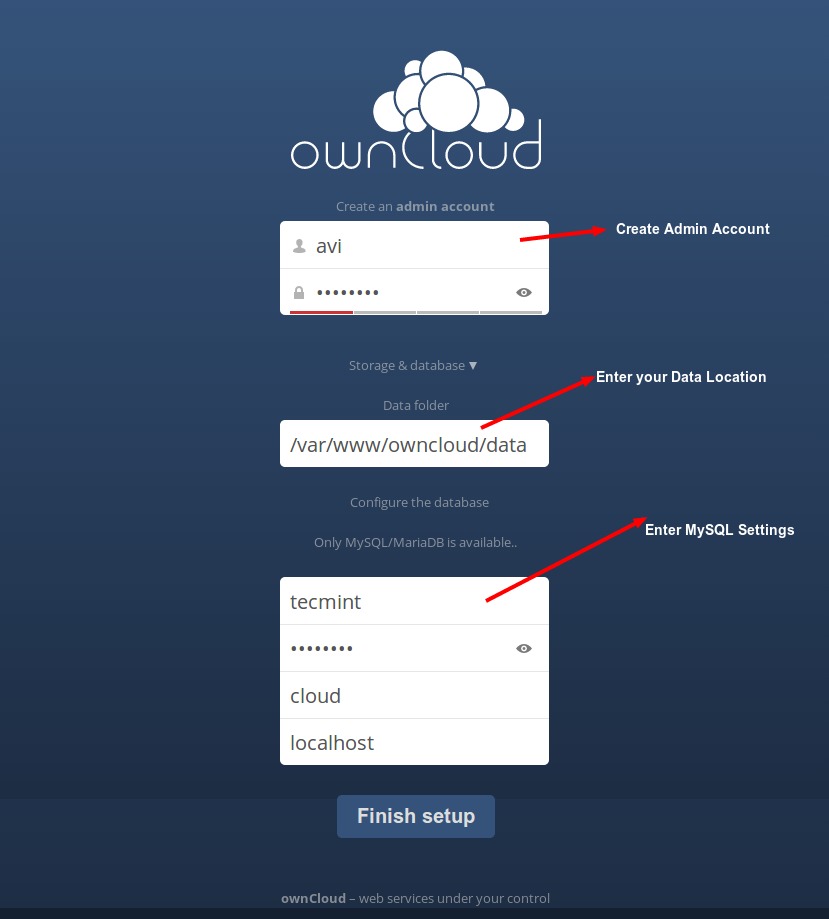
Once you get the Owncloud page, you need to create an admin account and a Data folder location, where all files/folders will be stored (or leave default location i.e. /var/www/owncloud/data or /var/www/html/owncloud/data). Next, you need to enter mysql database username, password and database name, refer the screenshot below.
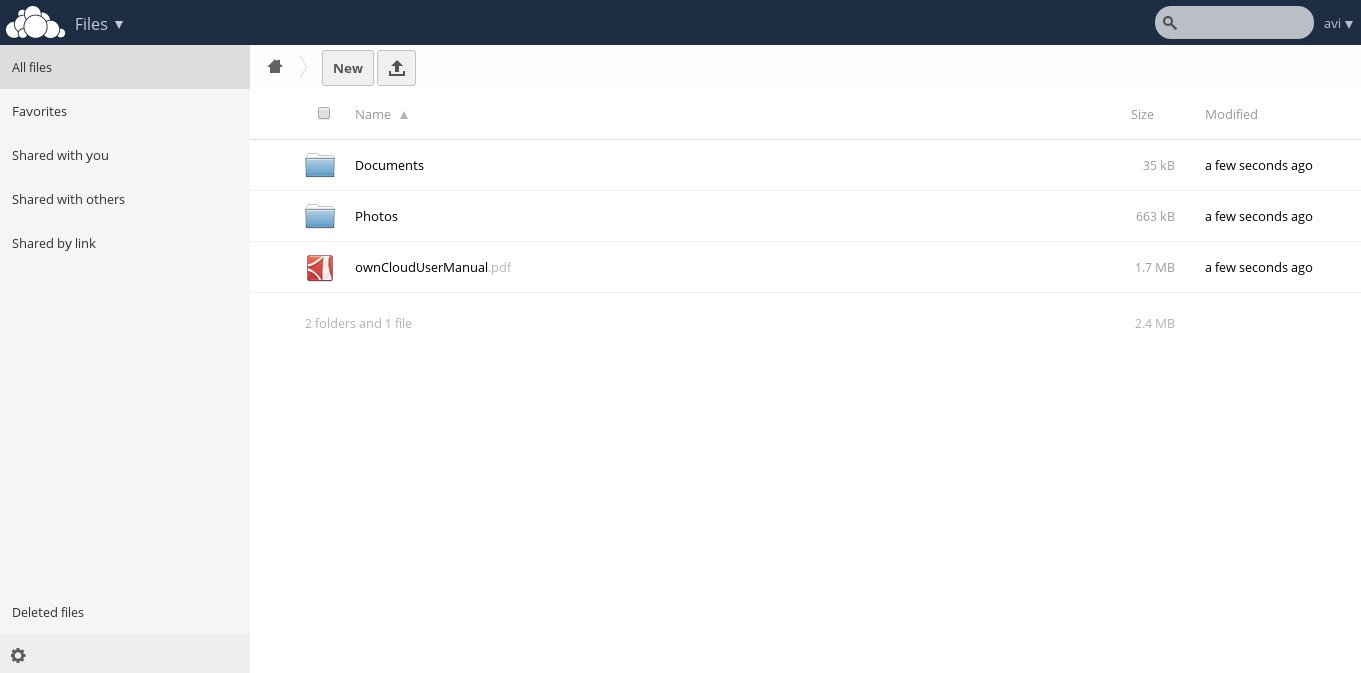
Once all the correct values are entered, click Finish and your private cloud storage is ready, you are greeted with the working interface:
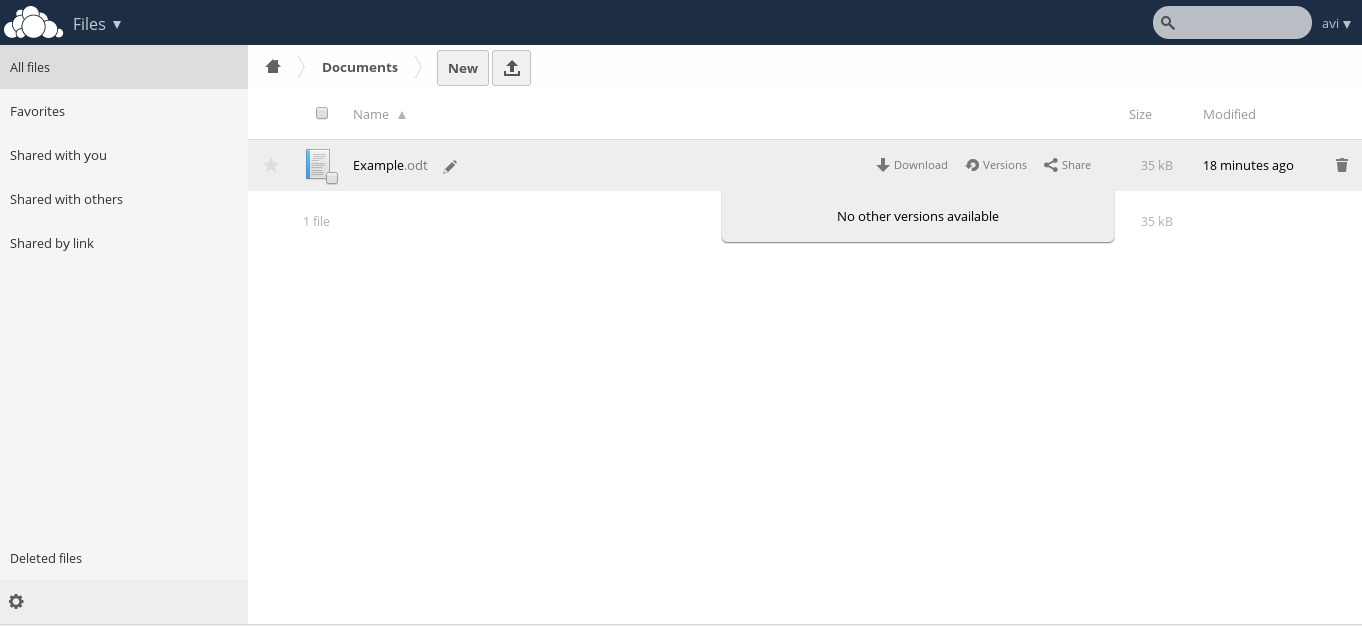
Notice the Favorites, edit, share, download, upload and new file options available for a file.
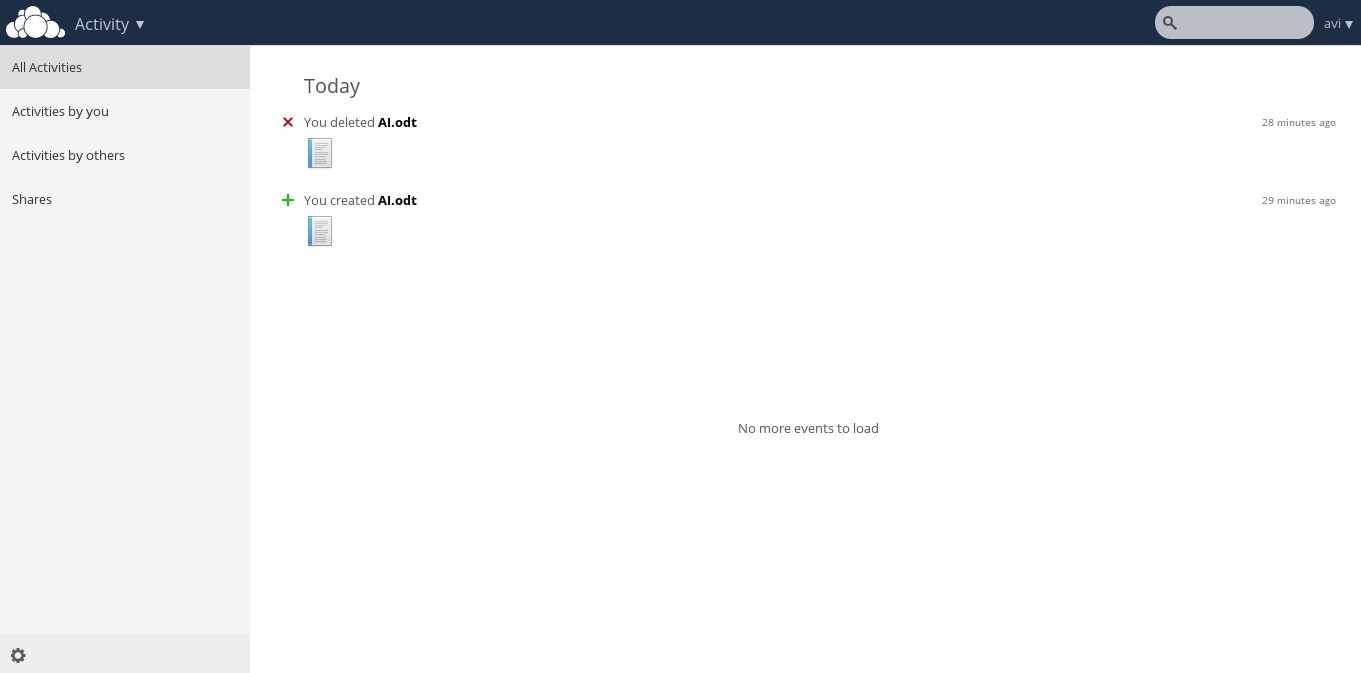
Activities log of oneself and others.
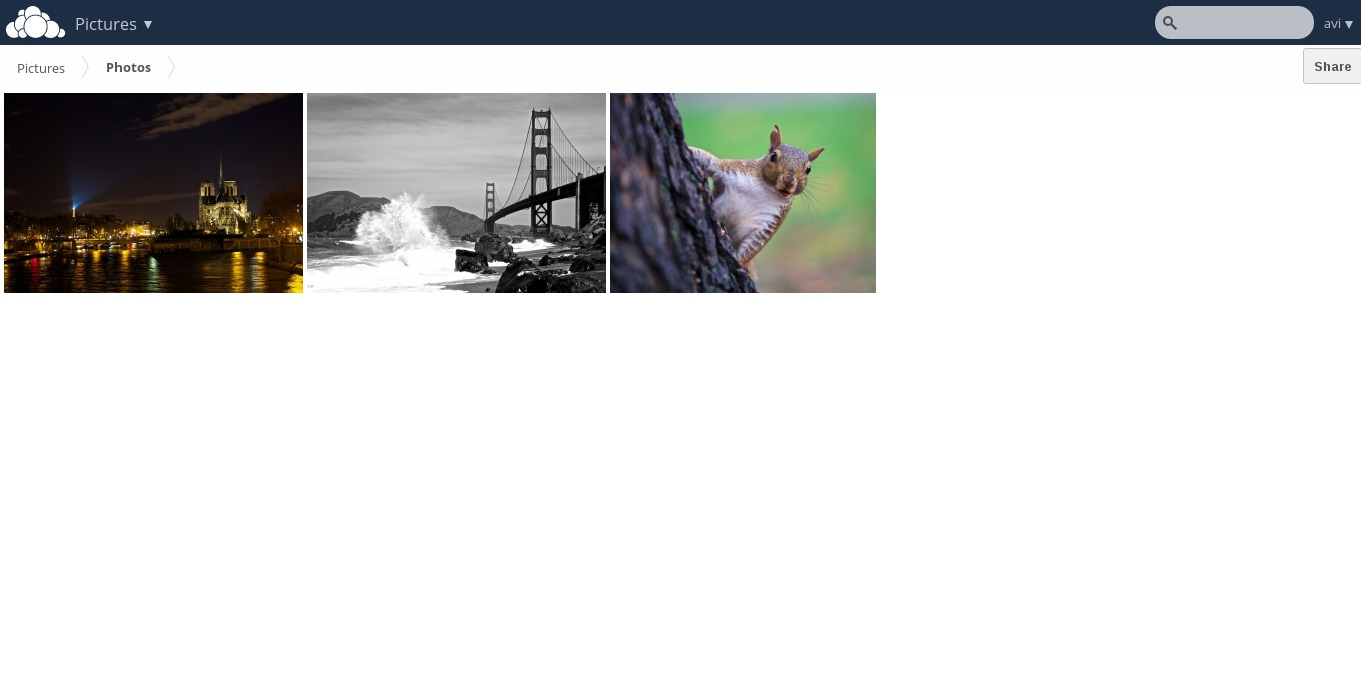
Pictures library.
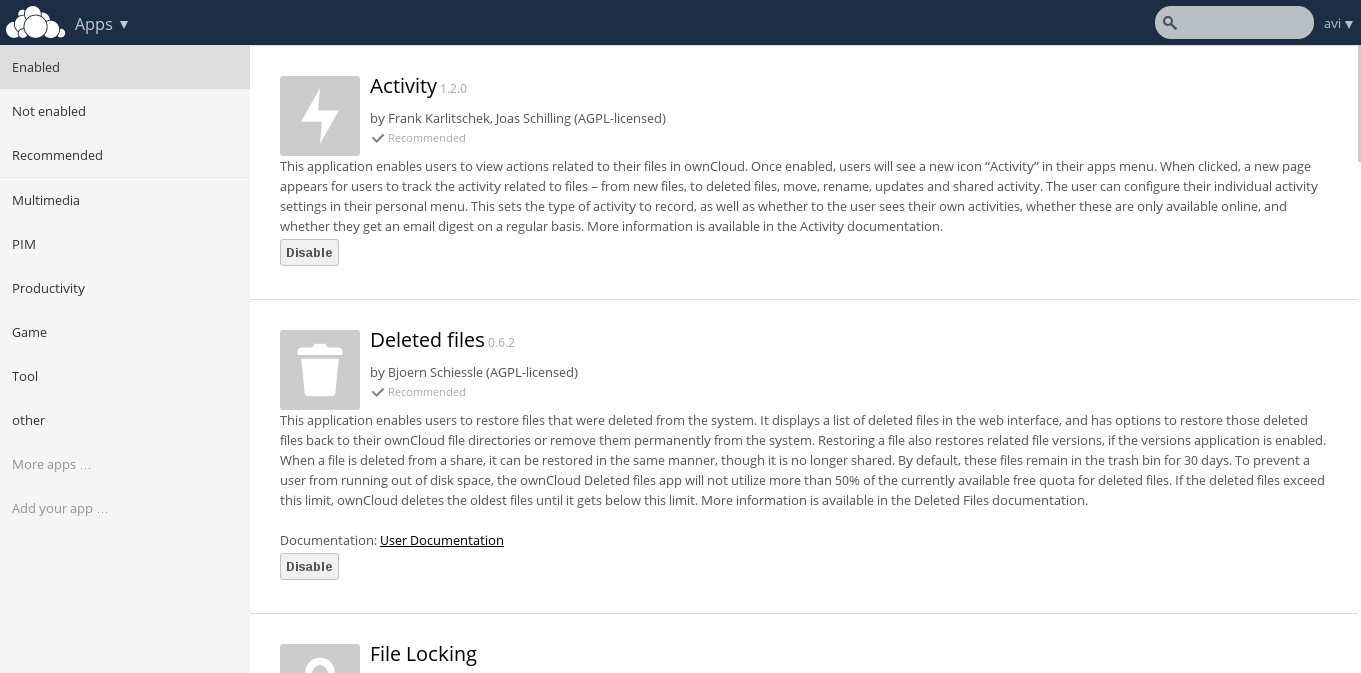
Apps enable and disable interface as well as recommendation with brief introduction.
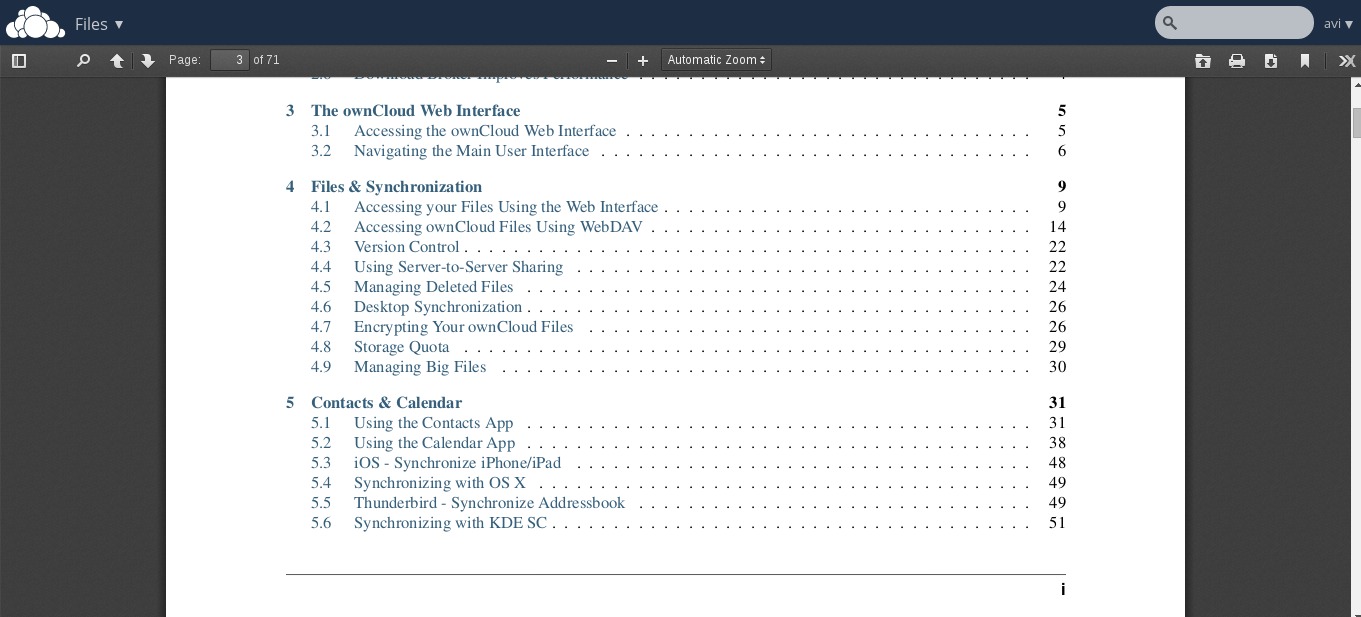
Inbuilt PDF reader.
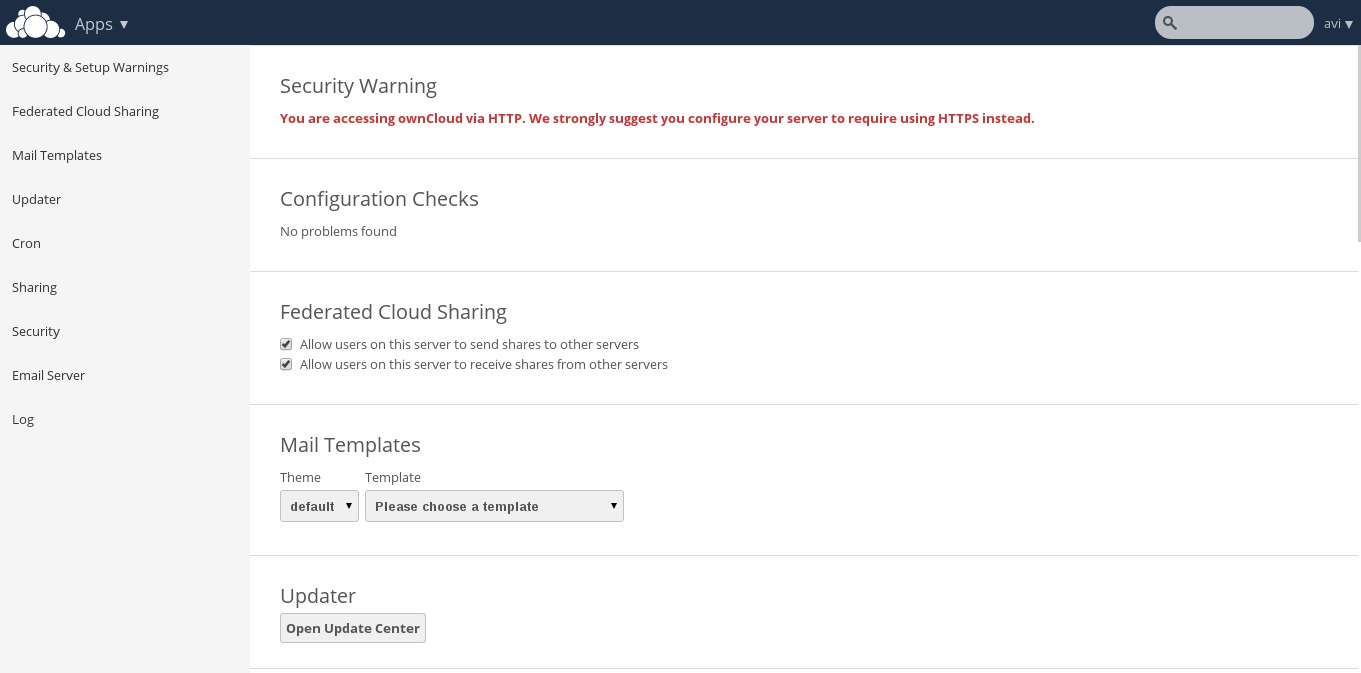
From this admin panel you can view security and setup warnings, Fedrated cloud sharing, Mail Templates,
Updater, Cron, sharing, Security, Email Server, Log, etc.
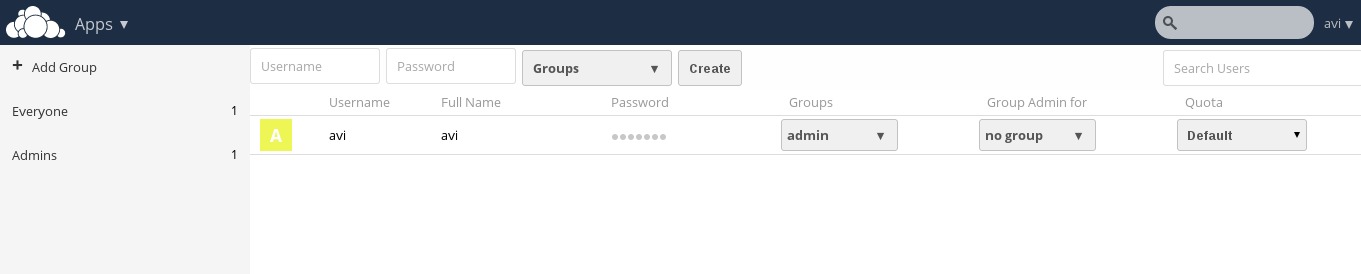
User and Group information with quota.
Note: You can add users or imports user account, change password, assign user role and allocate space by clicking the Gear icon on left bottom of the page.
You may now add folder, sync media files be it pictures, images and videos from the mobile application. Owncloud lets you add new user, and sync calendar, contacts, Media files, etc.
It also has a built in MP3 Player, PDF Viewer, Document Viewer, and a lot many which is worth a try and explore. So what are you waiting for? Become a proud owner of private cloud storage, give it a try!

Upgrading to Owncloud 8 from Older Versions

To update earlier version of your owncloud to 8, you need to first update the old owncloud to latest point release of the same version.
For example, if you’re using owncloud 6.0.xy (where ‘xy‘ is the version number), you need to first update to 6.0.x of the same series, and then you able to upgrade to owncloud 7 using the following instructions.

Update Owncloud 6.0.xx to 6.0.2

1. Making proper backup of everything is always suggested.
2. Enable the updater plugin (if it is disabled).
3. Go to Admin Panel and fire update.
4. Refresh page using ‘Ctrl+F5‘, you’re done.
If above procedure doesn’t worked, you can do a full upgrade to update to the newest point release (see ‘Upgrade‘ instructions below).
Else, if you’re already using Owncloud 7 and want to update to Owncloud 8, you can follow the below same ‘Upgrade’ instructions to get the latest version of Owncloud.

Upgrading OwnCloud to Latest Release

1. Update your owncloud version to latest point release of your version.
2. Not to Mention, Make a full backup before upgrading.
3. Download the latest tarball using wget command.
# wget http://download.owncloud.org/community/owncloud-latest.tar.bz2
4. Deactivate all native and third party Applications and plugins.
5. Delete Everything from the owncloud Directory except DATA and CONFIG directory.
NOTE: Don’t touch DATA and CONFIG directory.
6. Untar the tar-ball and copy everything to the root of your owncloud directory within your working directory.
7. Grant required permissions and run Upgrade from the Next page and its done!.
8. Don’t forget to install and enable Third party Application and plug-ins only after checking the compatibility with the current version.
So what are you waiting for? Install the latest owncloud project or upgrade your last version to latest and start using it.

Reference Links

  1. ownCloud Homepage

Monday, September 15, 2014

The Google Cloud Platform: 10 things you need to know

http://www.techrepublic.com/article/the-google-cloud-platform-10-things-you-need-to-know/?tag=nl.e077&s_cid=e077&ttag=e077&ftag=TRE9ae7a1a

The infrastructure-as-a-service (IaaS) market has exploded in recent years. Google stepped into the fold of IaaS providers, somewhat under the radar. The Google Cloud Platform is a group of cloud computing tools for developers to build and host web applications.
It started with services such as the Google App Engine and quickly evolved to include many other tools and services. While the Google Cloud Platform was initially met with criticism of its lack of support for some key programming languages, it has added new features and support that make it a contender in the space.
Here's what you need to know about the Google Cloud Platform.

1. Pricing

Google recently shifted its pricing model to include sustained-use discounts and per-minute billing. Billings starts with a 10-minute minimum and bills per minute for the following time. Sustained-use discounts begin after a particular instance is used for more than 25% of a month. Users receive a discount for each incremental minute used after they reach the 25% mark. Developers can find more information here.
If you're wondering what it would cost for your organization, try Google's pricing calculator.

2. Cloud Debugger

The Cloud Debugger gives developers the option to assess and debug code in production. Developers can set a watchpoint on a line of code, and any time a server request hits that line of code, they will get all of the variables and parameters of that code. According to Google blog post, there is no overhead to run it and "when a watchpoint is hit very little noticeable performance impact is seen by your users."

3. Cloud Trace

Cloud Trace lets you quickly figure out what is causing a performance bottleneck and fix it. The base value add is that it shows you how much time your product is spending processing certain requests. Users can also get a report that compares performances across releases.

4. Cloud Save

The Cloud Save API was announced at the 2014 Google I/O developers conference by Greg DeMichillie, the director of product management on the Google Cloud Platform. Cloud Save is a feature that lets you "save and retrieve per user information." It also allows cloud-stored data to be synchronized across devices.

5. Hosting

The Cloud Platform offers two hosting options: the App Engine, which is their Platform-as-a-Service and Compute Engine as an Infrastructure-as-a-Service. In the standard App Engine hosting environment, Google manages all of the components outside of your application code.
The Cloud Platform also offers managed VM environments that blend the auto-management of App Engine, with the flexibility of Compute Engine VMs.The managed VM environment also gives users the ability to add third-party frameworks and libraries to their applications.

6. Andromeda

Google Cloud Platform networking tools and services are all based on Andromeda, Google's network virtualization stack. Having access to the full stack allows Google to create end-to-end solutions without compromising functionality based on available insertion points or existing software.
According to a Google blog post, "Andromeda is a Software Defined Networking (SDN)-based substrate for our network virtualization efforts. It is the orchestration point for provisioning, configuring, and managing virtual networks and in-network packet processing."

7. Containers

Containers are especially useful in a PaaS situation because they assist in speeding deployment and scaling apps. For those looking for container management in regards to virtualization on the Cloud Platform, Google offers its open source container scheduler known as Kubernetes. Think of it as a Container-as-a-Service solution, providing management for Docker containers.

8. Big Data

The Google Cloud Platform offers a full big data solution, but there are two unique tools for big data processing and analysis on Google Cloud Platform. First, BigQuery allows users to run SQL-like queries on terabytes of data. Plus, you can load your data in bulk directly from your Google Cloud Storage.
The second tool is Google Cloud Dataflow. Also announced at I/O, Google Cloud Dataflow allows you to create, monitor, and glean insights from a data processing pipeline. It evolved from Google's MapReduce.

9. Maintenance

Google does routine testing and regularly send patches, but it also sets all virtual machines to live migrate away from maintenance as it is being performed.
"Compute Engine automatically migrates your running instance. The migration process will impact guest performance to some degree but your instance remains online throughout the migration process. The exact guest performance impact and duration depend on many factors, but it is expected most applications and workloads will not notice," the Googledeveloper website said.
VMs can also be set to shut down cleanly and reopen away from the maintenance event.

10. Load balancing

In June, Google announced the Cloud Platform HTTP Load Balancing to balance the traffic of multiple compute instances across different geographic regions.
"It uses network proximity and backend capacity information to optimize the path between your users and your instances, and improves latency by connecting users to the closest Cloud Platform location. If your instances in one region are under heavy load or become unreachable, HTTP load balancing intelligently directs new requests to your available instances in a nearby region," a Google blog post said.

Monday, June 23, 2014

Top 10 Cloud Computing Certifications

http://www.cio.com/slideshow/detail/129043#slide10

As the cloud becomes more critical to IT departments and businesses worldwide, it can be difficult to gauge whether you have the right skills or knowledge in a competitive job market. If you're looking for a way to get an extra edge -- whether you're job hunting, angling for a promotion, or just want tangible, third-party proof of your skills -- cloud certification is a great option. Certifications measure your knowledge and skills against industry- and vendor-specific benchmarks to prove to employers that you have the right mix of cloud skills, knowledge, and expertise. Here 10 ten cloud computing certifications you should consider.


1. CCSK -- Cloud Security Alliance
What it's all about: This is the mother of all cloud computing security certifications. The Certificate of Cloud Security Knowledge certification is vendor-neutral, and certifies competency in key cloud security areas. The test is based on the Cloud Security Alliance Security Guidance for Critical Areas of Focus in Cloud Computing V3, English language version, and the ENISA report "Cloud Computing: Benefits, Risks and Recommendations for Information Security."
How to prepare: The best way to prepare is to study the CSA Security Guidance for Critical Areas of Focus in Cloud Computing v3, and the ENISA report "Cloud Computing: Benefits, Risks, and Recommendations for Information Security."
More on CSA Guidance
More on ENISA

2. Cloud U -- Rackspace
What it's all about: According to Rackspace, Cloud U is a vendor-neutral curriculum designed for IT professionals and business leaders that covers and certifies knowledge of the fundamentals of Cloud Computing. Cloud U content is available to any professional at any time, but if you want a formal recognition of your knowledge about Cloud Computing, you should complete the courses and requirements for a certificate.
How to prepare: Study each Cloud U lesson whitepaper, and then successfully complete each of 10 Cloud U lesson quizzes based on the whitepaper's content. Successfully complete a 50-question final exam drawn from materials covered in the 10 Cloud U lessons.
More on Cloud U

3. CompTIA Cloud Essentials -- Comp TIA
What it's all about: According to CompTIA, the Cloud Essentials Certification covers the basic fundamentals of cloud computing and shows that individuals understand cloud computing from both a business and a technical perspective. In addition, the certification covers migration to the cloud and governance of cloud computing environments.
How to prepare: CompTIA offers study and training materials, and -- while it's not required -- CompTIA recommends that individuals taking the exam have at least six months experience working in an IT services environment.

4. Cloud Certified Professional -- CloudSchool.com
What it's all about: CloudSchool.com offers a number of vendor-neutral cloud certifications, each based on a one-day course module and aimed at competency in specific areas of cloud computing. There are certificates for Cloud Architects, Cloud Technology Professionals, Cloud Governance, and Cloud security, among others.
How to prepare: Cloud School offers self-study kits as well as on-site and remote workshops and study sessions and instructor-led workshops to help prepare applicants for the exams.
More on CloudSchool.com

5 & 6. IBM Certified Cloud Solution Architect v1 and v3 - IBM
What it's all about: IBM has two cloud-specific certification: IBM Certified Solution Architect v1 and v3. These solutions architects will demonstrate the design, plan, architecture and management capabilities for IBM's cloud computing infrastructure once they've completed the certification requirements. According to IBM, these certifications, "Provide a reliable, valid and fair method of assessing skills and knowledge; provide IBM a method of building and validating the skills of individuals and organizations; and to develop a loyal community of highly skilled certified professionals."
How to prepare: You should have a working knowledge of cloud fundamentals and a basic knowledge of IBM cloud computing essentials. You will be required to take a test to confirm that knowledge for each version of the certification exam.

7. Google Certified Deployment Specialist -- Google
What it's all about: This is Google's technical certification; the applications giant also has a Google Certified Sales Specialist. This certification covers the fundamental skills, knowledge and technical expertise required to deploy Google Apps for Business and Education, according to Google.
How to prepare: Google recommends gaining practical experience by participating in at least three Google Apps for Business deployments, and having at least 3 to 6 years of hands-on IT experience. You'll also complete hands-on, online, self-paced training and, finally, take an exam.

8. Salesforce.com Certified Professional -- Salesforce.com
What it's all about: Salesforce.com offers several certification tracks, including Salesforce Administrator, Force.com Developer, Implementation Expert, and Architect.
How to prepare: According to Salesforce.com, the certification tests real-world knowledge as much as book learning, and each certification track offers a variety of ways to prepare for the exams. There are individualized programs available for everyone available on the company's web site.

9. VMware Certified Professional - VMware
What it's all about: The virtualization pioneer offers six cloud-specific certifications, from beginner to advanced. These tracks certify knowledge and expertise in a variety of cloud and virtualization-related technologies and methodologies. Offerings include the VMware Certified Associate -- Cloud, VMware Certified Professional -- Cloud, and VMware Certified Advanced Professional, among others.
How to prepare: Study and preparation materials are available through VMware, and real-world experience with cloud and virtualization are also highly recommended.

10. Red Hat Certificate of Expertise in Infrastructure-as-a-Service -- Red Hat
What it's all about: This is one of the newest cloud certifications available. The Red Hat Certificate measures professionals' ability to design, build, deploy and manage private clouds based on the Red Hat Enterprise Linux OpenStack platform.
How to prepare: Red Hat says the best way to prepare for the exam is hands-on, real-world experience. The exam is also a live, real- world test of skills and competency, requiring candidates to perform tasks on a live system.

Friday, February 7, 2014

Cloud Computing....?

Cloud Computing is the use of Computing Resources(Hardware like Hypervisor,Storage,switches  & Software like Virtualization,vlan trafficing , dynamic ip allocation ) that are delivered as Service over the Network.It's called cloud since all these above mentioned resources can be scaled on request  and based on usage.


Why cloud Computing is preferred / benefits of Cloud Computing

·      Scalability : -The customer doesn't have to know (and buy) the full capacity they might need at a peak time. Cloud computing makes it possible to scale the resources available to the application. A start-up business doesn't have to worry if the advertising campaign works a bit too well and jams the servers.

·      Pay Per Use :- Customers pay only for what they use. They don’t have to buy servers or capacity for their maximum needs. Often, this is a cost savings.

·    The cloud will automatically (or, in some services, with semi-manual operations) allocate and de-allocate CPU, storage, and network bandwidth on demand. When there are few users on a site, the cloud uses very little capacity to run the site, and vice versa.

·     Reduces Cost :- Because the data centers that run the services are huge, and share resources among a large group of users, the infrastructure costs are lower (electricity, buildings, and so on). Thus, the costs that are passed on to the customer are smaller.

·    Application programming interface (API):- Accessibility to software that enables machines to interact with cloud software in the same way that a traditional user interface (e.g., a computer desktop) facilitates interaction between humans and computers

·   Virtualization technology allows servers and storage devices to be shared and utilization be increased. Applications can be easily migrated from one physical server to another.

Types of Cloud Computing :-

·         Public Cloud
·         Private Cloud
·         Hybrid Cloud

Public Cloud  :- In public cloud applications, storage, and other resources are made available to the general public by a service provider. These services are free or offered on a pay-per-use model. Generally, public cloud service providers like Amazon AWS, Microsoft and Google own and operate the infrastructure and offer access only via Internet

Private Cloud : - Private cloud is cloud infrastructure operated solely for a single organization, whether managed internally or by a third-party and hosted internally or externally.

Hybrid Cloud : -  Hybrid cloud uses both public and private cloud infrastructure.

Cloud computing  Models


·       Infrastructure as a Service (IaaS).  IaaS  offers  computers - physical or  virtual machines - and other resources like storage so that developers and IT organizations can use to deliver business solutions.Cloud providers typically bill IaaS services on a utility computing basis: cost reflects the amount of resources allocated and consumed.

·         Platform as a Service (PaaS). Pass offers computing platform typically including operating system, programming language execution environment, database, and web server. Application developers can develop and run their software solutions on a cloud platform without the cost and complexity of buying and managing the underlying hardware and software layers.

·       Software as a Service (SaaS). In the SaaS , the service provider hosts the software so you don’t need to install it, manage it, or buy hardware for it. All you have to do is connect and use it. SaaS Examples include customer relationship management as a service.